To create a project plan, agree the goal and how success will be measured, define what is in and out of scope, break the deliverables into owned tasks, map dependencies and milestones, check estimates against real capacity, list the top risks, and agree how the team will communicate and approve changes. Then record that version as your baseline and keep it current. For most projects, all of that fits on one page plus a task list.
This guide walks through each step with the output it should produce, then gives you a copyable one-page template and a filled-in example for a non-software project: moving a 45-person accounting firm to a new office. It ends with how to adapt the plan for Agile teams and how to keep it alive after kickoff.
What a project plan is, and what it is not
A project plan is the agreed answer to how a project will deliver its goal: the scope, the work, who owns it, when it happens, what could go wrong and how decisions get made. It sits between two other documents that people often confuse with it.
Project charter or brief
- Answers
- Why are we doing this, and who has authority?
- Created
- Before planning starts
Project plan
- Answers
- How will we deliver it: scope, tasks, schedule, risks, communication?
- Created
- During planning, then kept current
Schedule or timeline
- Answers
- When does each task happen?
- Created
- Part of the plan
Status report
- Answers
- Where are we against the plan?
- Created
- Weekly or every two weeks during delivery
| Document | Answers | Created |
|---|---|---|
| Project charter or brief | Why are we doing this, and who has authority? | Before planning starts |
| Project plan | How will we deliver it: scope, tasks, schedule, risks, communication? | During planning, then kept current |
| Schedule or timeline | When does each task happen? | Part of the plan |
| Status report | Where are we against the plan? | Weekly or every two weeks during delivery |
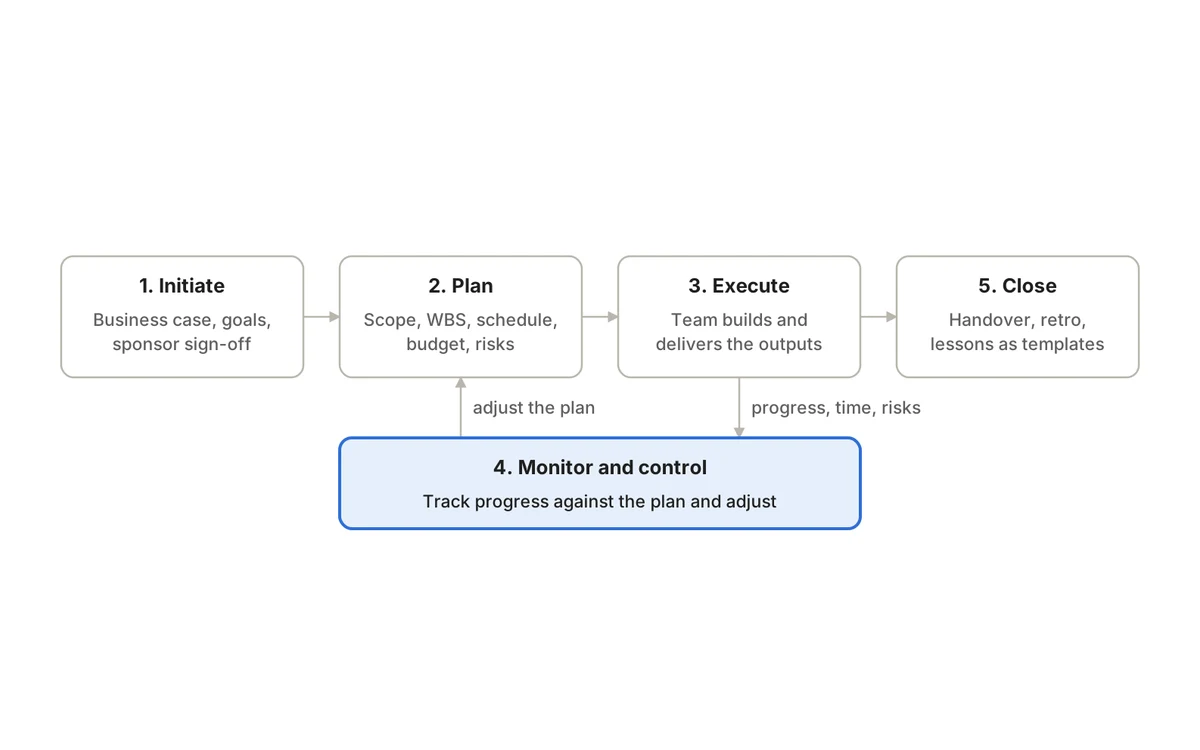
Planning is the second of the five phases of project management; the charter from initiation is your main input.
Before you start: gather your inputs
- The approved charter or brief, including the sponsor and success measures.
- Fixed constraints: deadlines, budget ceilings, contractual or regulatory requirements.
- Who is available, for how many hours, and when they are away.
- Lessons and templates from similar past projects.
- A list of stakeholders and what each needs from the project.
Step 1: State the goal and how you will measure success
Write the goal as an outcome, then add two to four measures that tell you whether you achieved it. Good measures are specific, checkable by someone other than the project team, and tied to the reason the project exists.
Move to the new office
- Stronger
- All 45 staff working from the new office by 1 March with no lost client-facing working days
Improve onboarding
- Stronger
- New hires fully set up with equipment and system access on their first day
Launch the campaign
- Stronger
- Campaign live in three regions by launch week, with tracking verified before spend starts
| Weak | Stronger |
|---|---|
| Move to the new office | All 45 staff working from the new office by 1 March with no lost client-facing working days |
| Improve onboarding | New hires fully set up with equipment and system access on their first day |
| Launch the campaign | Campaign live in three regions by launch week, with tracking verified before spend starts |
Output: a one-paragraph goal statement with measurable success criteria, confirmed by the sponsor.
Step 2: Define scope, exclusions and acceptance criteria
List the deliverables the project will produce and, for each, what “accepted” means. Then list what is explicitly out of scope. Exclusions are the cheapest risk control you have: every request that later appears can be checked against them instead of argued from memory.
Output: a scope list with acceptance criteria and a written out-of-scope list.
Step 3: Break the deliverables into tasks
Create a work breakdown structure: split each deliverable into smaller pieces until each piece has a clear output, one accountable owner and a size you can track, typically something one person or a small group can finish within a week or two. A useful check is that the pieces should add up to the whole deliverable, no more and no less. If a task cannot be estimated or assigned, it is either too big or not yet understood.
Output: a task list or backlog where every item has an owner and a clear definition of done.
Step 4: Map dependencies and the critical path
For each task, ask what must finish before it can start, and whether it relies on anyone outside the team, such as a supplier, a client approval or another department. The longest chain of dependent tasks is the critical path: any delay on it moves the end date. Tasks off the critical path have slack, which tells you where you can absorb surprises.
Output: dependencies recorded against tasks and the critical path identified.
Step 5: Estimate effort and check capacity
Estimate each task’s effort, ideally with the person who will do it. For uncertain work, a three-point estimate helps: an optimistic, a most-likely and a pessimistic figure. Then compare total effort with real availability. Remove holidays, support duties and other projects, and look for specialists whose time is needed on several tasks at once. Our guide to time tracking and resource planning goes deeper on capacity.
Output: effort estimates, a capacity check by person or role, and recorded assumptions.
Step 6: Set milestones and build the schedule
Milestones mark decisions or checkpoints that matter to the sponsor, such as a signed lease, an approved design or a go-live readiness review. Three to six milestones are usually enough for a project of a few months. Lay the tasks onto a timeline using the dependencies and capacity from steps 4 and 5, and add buffer before milestones that depend on outside parties.
Output: a schedule with dated milestones, each with an acceptance condition.
Step 7: Confirm the budget and resources
Total the costs: people’s time, suppliers, equipment, licenses and a contingency proportionate to the uncertainty. State who can approve spending against each line. If the estimate exceeds the approved budget, go back to the sponsor now with options (reduce scope, extend time, add funding) rather than hoping it works out.
Output: a budget with owners and contingency, reconciled with the approved figure.
Step 8: Identify and plan for the top risks
List the risks that could most damage the goal. For each, note likelihood, impact, an owner and the next action to reduce it. Five to ten well-owned risks are more useful than fifty nobody reads. Our project risk management guide shows how to score and review them.
Output: a short risk register with owners and next actions.
Step 9: Agree communication, decisions and change control
Decide where updates live, how often the team and sponsor review progress, who makes which decisions, and how a change request is assessed and approved. For a small project, a weekly 20-minute review and a rule that any change moving a milestone needs the sponsor’s approval may be all you need. Our status report template gives you a format for the regular update.
Output: a communication rhythm, a decision-rights list and a change-control rule.
Step 10: Baseline the plan and keep it current
Once the sponsor and team agree, save that version as the baseline. As things change, update the forecast but keep the baseline, so you can see and explain variance. Review the plan at a fixed rhythm and after any significant change, and choose a handful of project KPIs that show whether you are on course.
Output: an approved baseline and a review rhythm.
Copyable one-page project plan template
Copy this table into a doc or spreadsheet and replace the brackets. Keep each cell short; link to detail rather than pasting it in.
Project name
- What to write
- A short, recognizable name
- Your plan
- [ ]
Sponsor
- What to write
- Who funds it and makes priority calls
- Your plan
- [ ]
Project lead
- What to write
- Who runs it day to day
- Your plan
- [ ]
Problem
- What to write
- Why this project exists, in one or two sentences
- Your plan
- [ ]
Goal
- What to write
- The outcome you want
- Your plan
- [ ]
Success measures
- What to write
- Two to four checkable criteria
- Your plan
- [ ]
In scope
- What to write
- Deliverables and their acceptance criteria
- Your plan
- [ ]
Out of scope
- What to write
- What the project will not do
- Your plan
- [ ]
Milestones
- What to write
- Date plus acceptance condition for each
- Your plan
- [ ]
Key tasks and owners
- What to write
- Link to the full task list
- Your plan
- [ ]
Critical dependencies
- What to write
- External approvals, suppliers, other teams
- Your plan
- [ ]
Budget and capacity
- What to write
- Approved amount, contingency, people and hours
- Your plan
- [ ]
Top risks
- What to write
- Risk, owner, next action
- Your plan
- [ ]
Assumptions
- What to write
- What you are taking as true
- Your plan
- [ ]
Communication
- What to write
- Where updates live and review rhythm
- Your plan
- [ ]
Change control
- What to write
- Who approves what kind of change
- Your plan
- [ ]
Approval
- What to write
- Sponsor name and date approved
- Your plan
- [ ]
| Section | What to write | Your plan |
|---|---|---|
| Project name | A short, recognizable name | [ ] |
| Sponsor | Who funds it and makes priority calls | [ ] |
| Project lead | Who runs it day to day | [ ] |
| Problem | Why this project exists, in one or two sentences | [ ] |
| Goal | The outcome you want | [ ] |
| Success measures | Two to four checkable criteria | [ ] |
| In scope | Deliverables and their acceptance criteria | [ ] |
| Out of scope | What the project will not do | [ ] |
| Milestones | Date plus acceptance condition for each | [ ] |
| Key tasks and owners | Link to the full task list | [ ] |
| Critical dependencies | External approvals, suppliers, other teams | [ ] |
| Budget and capacity | Approved amount, contingency, people and hours | [ ] |
| Top risks | Risk, owner, next action | [ ] |
| Assumptions | What you are taking as true | [ ] |
| Communication | Where updates live and review rhythm | [ ] |
| Change control | Who approves what kind of change | [ ] |
| Approval | Sponsor name and date approved | [ ] |
Pair it with a simple task list:
[Task]
- Owner
- [Name]
- Estimate
- [Hours or days]
- Depends on
- [Task or none]
- Due
- [Date]
| Task | Owner | Estimate | Depends on | Due |
|---|---|---|---|---|
| [Task] | [Name] | [Hours or days] | [Task or none] | [Date] |
Filled-in example: moving an accounting firm to a new office
A 45-person accounting firm is moving to a new office when its lease ends. The project lead is the operations manager; the sponsor is the managing partner. Figures and dates below are illustrative.
Project name
- Example
- Office move 2027
Sponsor
- Example
- Managing partner
Project lead
- Example
- Operations manager
Problem
- Example
- Current lease ends 28 February and the space no longer fits the team
Goal
- Example
- Move all staff and systems to the new office with no disruption to client work
Success measures
- Example
- All staff working from the new office by 1 March; no client-facing working days lost; phones and systems working on day one; move within the approved budget
In scope
- Example
- Fit-out coordination, furniture, network and phones, IT equipment move, removals, staff communication, address change notices
Out of scope
- Example
- Replacing the practice management software; new hardware purchases beyond meeting-room screens
Milestones
- Example
- Fit-out complete (week 8); network and phones tested (week 10); move weekend (week 12); old office handed back (week 13)
Key tasks and owners
- Example
- Fit-out: facilities lead. Network: IT provider. Removals: operations manager. Comms: office manager
Critical dependencies
- Example
- Landlord approval of fit-out plans; internet line installation lead time; removals booking
Budget and capacity
- Example
- Approved budget with 10% contingency; operations manager about two days a week; IT provider on a fixed quote
Top risks
- Example
- Internet line not live on time (IT provider; order in week 1, arrange a backup connection); move clashes with a client deadline (sponsor; check the tax calendar before fixing the date)
Assumptions
- Example
- Landlord approves plans within two weeks; existing desks can be reused
Communication
- Example
- Weekly 20-minute review; update email every two weeks to all staff; plan and decisions kept in one shared workspace
Change control
- Example
- Operations manager approves changes within contingency; anything moving the move date or budget goes to the sponsor
Approval
- Example
- Managing partner, week 1
| Section | Example |
|---|---|
| Project name | Office move 2027 |
| Sponsor | Managing partner |
| Project lead | Operations manager |
| Problem | Current lease ends 28 February and the space no longer fits the team |
| Goal | Move all staff and systems to the new office with no disruption to client work |
| Success measures | All staff working from the new office by 1 March; no client-facing working days lost; phones and systems working on day one; move within the approved budget |
| In scope | Fit-out coordination, furniture, network and phones, IT equipment move, removals, staff communication, address change notices |
| Out of scope | Replacing the practice management software; new hardware purchases beyond meeting-room screens |
| Milestones | Fit-out complete (week 8); network and phones tested (week 10); move weekend (week 12); old office handed back (week 13) |
| Key tasks and owners | Fit-out: facilities lead. Network: IT provider. Removals: operations manager. Comms: office manager |
| Critical dependencies | Landlord approval of fit-out plans; internet line installation lead time; removals booking |
| Budget and capacity | Approved budget with 10% contingency; operations manager about two days a week; IT provider on a fixed quote |
| Top risks | Internet line not live on time (IT provider; order in week 1, arrange a backup connection); move clashes with a client deadline (sponsor; check the tax calendar before fixing the date) |
| Assumptions | Landlord approves plans within two weeks; existing desks can be reused |
| Communication | Weekly 20-minute review; update email every two weeks to all staff; plan and decisions kept in one shared workspace |
| Change control | Operations manager approves changes within contingency; anything moving the move date or budget goes to the sponsor |
| Approval | Managing partner, week 1 |
And the start of its task list:
Submit fit-out plans to landlord
- Owner
- Facilities lead
- Estimate
- 2 days
- Depends on
- None
- Due
- Week 1
Order internet line and backup connection
- Owner
- IT provider
- Estimate
- 1 day
- Depends on
- None
- Due
- Week 1
Confirm move date against client deadlines
- Owner
- Managing partner
- Estimate
- 1 hour
- Depends on
- None
- Due
- Week 2
Book removals company
- Owner
- Operations manager
- Estimate
- 1 day
- Depends on
- Move date confirmed
- Due
- Week 3
Install network cabling and Wi-Fi
- Owner
- IT provider
- Estimate
- 4 days
- Depends on
- Fit-out complete
- Due
- Week 9
Test phones, printers and remote access
- Owner
- IT provider
- Estimate
- 2 days
- Depends on
- Network installed
- Due
- Week 10
Send address change notices
- Owner
- Office manager
- Estimate
- 2 days
- Depends on
- Move date confirmed
- Due
- Week 11
| Task | Owner | Estimate | Depends on | Due |
|---|---|---|---|---|
| Submit fit-out plans to landlord | Facilities lead | 2 days | None | Week 1 |
| Order internet line and backup connection | IT provider | 1 day | None | Week 1 |
| Confirm move date against client deadlines | Managing partner | 1 hour | None | Week 2 |
| Book removals company | Operations manager | 1 day | Move date confirmed | Week 3 |
| Install network cabling and Wi-Fi | IT provider | 4 days | Fit-out complete | Week 9 |
| Test phones, printers and remote access | IT provider | 2 days | Network installed | Week 10 |
| Send address change notices | Office manager | 2 days | Move date confirmed | Week 11 |
Notice what the plan does. The internet line, a classic long-lead item, is ordered in week one with a backup. The move date is checked against the firm’s busiest periods before anything is booked. And the change rule means the operations manager can solve small problems without escalating, while anything that threatens the date goes to the person who can trade it off.
Adapting the plan for Agile teams
Agile teams still need most of the one-page plan: the goal, success measures, constraints, risks, stakeholders and decision rights. What changes is the level of detail. Instead of a full task list for months ahead, they keep an ordered backlog, plan in detail one iteration at a time and treat milestones as release goals. The baseline is usually the goal, budget and target date, with scope prioritized inside them.
Common planning mistakes
- Writing a long document nobody opens after kickoff. Short and current beats complete and stale.
- Planning everyone at 100% of their time, which guarantees slippage.
- Treating estimates as promises instead of recording the assumptions behind them.
- Turning every task into a milestone, so real decision points get lost.
- Skipping exclusions, then fighting scope creep without a reference point.
- Changing the baseline quietly so the project always looks on track.
Where QuikProjects fits
A plan is most useful when it lives where the work is updated. In QuikProjects, the one-page plan can sit in the project wiki beside the tasks it describes, work can be planned on a timeline with real dependencies and warnings when dates collide, and custom fields and dependencies are available from Premium. Timesheets with approvals feed planned-versus-actual hours, the workload view shows who is overloaded before you commit them, and the executive report shows what is slipping. For a broader introduction to the discipline, see our guide to project management.
Frequently asked questions
How long should a project plan be?
Long enough to coordinate the work and no longer. For most small and mid-sized projects, a one-page summary plus a task list is enough. High-risk or regulated projects need more detail on testing, approvals and change control, but the one-page summary is still worth keeping at the front.
What is the difference between a project plan and a project charter?
The charter authorizes the project: why it exists, who sponsors it and the authority of the project lead. The plan describes how the project will be delivered: scope, tasks, schedule, budget, risks and communication. The charter comes first and is the main input to the plan.
Who should write the project plan?
The project lead owns it, but the people doing the work should help build it, especially estimates and dependencies. The sponsor approves the final version. A plan written alone by one person tends to miss hand-offs and overestimate availability.
How often should you update the plan?
Review it at a fixed rhythm, often weekly, and whenever a significant change, risk or decision occurs. Update forecasts as you go, but keep the approved baseline so variance stays visible.
The bottom line
A good project plan is a short, shared agreement about the goal, the work, the owners, the risks and the rules for change, kept current for the life of the project. Start with the one-page template, fill it in with the people doing the work, and review it every week.
Keep your plan, tasks and progress in one place. Start free with QuikProjects for up to 10 users, no credit card needed.
Sources
See it running on your business.
A walkthrough built around how your team works today.