Last quarter your team launched a website. Before that it was an office move, a client onboarding and a product release. Each one had a deadline, a budget and a group of people who had to work together without dropping the ball. That is project management, whether or not anyone on your team has “project manager” in their title.
Most teams find it harder than it looks. Only 36% of organisations mostly or always finish projects on time, according to Wellingtone’s 2026 State of Project Management report. And in PMI’s 2026 Pulse of the Profession, 81% of project professionals say their projects have become more complex in recent years.
This guide explains what project management is, the five phases every project moves through, how to choose a methodology that fits your team, and a 7-step plan you can use on your next project this week.
What is project management?
Project management is the practice of planning, organising and steering temporary work so it delivers an agreed result on time, within budget and to the expected quality. It turns a goal such as “launch the new app by March” into a plan, assigns the work, tracks progress and adjusts when reality changes.
Three traits make something a project rather than routine work:
- It has a start and an end. Payroll runs every month; a payroll-system migration finishes.
- It produces a specific outcome. A feature, a campaign, a building, a trained team.
- It is new in some way. Even a repeat project brings new people, risks or constraints.
Operations keep the business running. Projects change it. Project management is the discipline built for that change, and the same principles apply whether you run a five-person agency or a 500-person engineering organisation.
Why project management matters in 2026
Structure is the difference between projects that land and projects that drift. In PMI’s 2026 research, 88% of projects were rated very or extremely successful when teams handled complexity well, against just 14% when they handled it poorly.
The latest numbers show how much room most teams have to improve:
Organisations that mostly or always deliver on time
- Figure
- 36%
- Source
- Wellingtone, 2026
Organisations that mostly or always deliver on budget
- Figure
- 49%
- Source
- Wellingtone, 2026
Project professionals who spend half a day or more each month just compiling status reports
- Figure
- 72%
- Source
- Wellingtone, 2026
Organisations still planning projects in Excel, or with no PM tool at all
- Figure
- 22% and 11%
- Source
- Wellingtone, 2026
Complex projects that miss part of their intended benefits
- Figure
- 31%
- Source
- PMI Pulse of the Profession, 2026
Success rate with a structured framework vs. without one
- Figure
- 72% vs. 61%
- Source
- PMI Pulse of the Profession, 2026
| Finding | Figure | Source |
|---|---|---|
| Organisations that mostly or always deliver on time | 36% | Wellingtone, 2026 |
| Organisations that mostly or always deliver on budget | 49% | Wellingtone, 2026 |
| Project professionals who spend half a day or more each month just compiling status reports | 72% | Wellingtone, 2026 |
| Organisations still planning projects in Excel, or with no PM tool at all | 22% and 11% | Wellingtone, 2026 |
| Complex projects that miss part of their intended benefits | 31% | PMI Pulse of the Profession, 2026 |
| Success rate with a structured framework vs. without one | 72% vs. 61% | PMI Pulse of the Profession, 2026 |
Sources: Wellingtone State of Project Management 2026; PMI Pulse of the Profession 2026.
6 benefits of good project management
- 1.Dates you can trust. A realistic plan with dependencies mapped means fewer missed launches and fewer awkward client calls.
- 2.Fewer surprises. Naming risks at the start lets you prepare a plan B before a vendor slips or a key person leaves.
- 3.Less wasted effort. Clear owners stop two people doing the same task while a third task gets forgotten.
- 4.Progress without status meetings. When work lives in one shared system, anyone can see where things stand. No more Friday afternoons building a slide deck.
- 5.Aligned stakeholders. Agreed scope and regular updates mean the sponsor, the client and the team expect the same result.
- 6.Wins you can repeat. Lessons captured at the end become templates that make the next project faster.
Demand for these skills keeps rising: PMI estimates the world will need 25 million more project professionals by 2030.
The 5 phases of project management
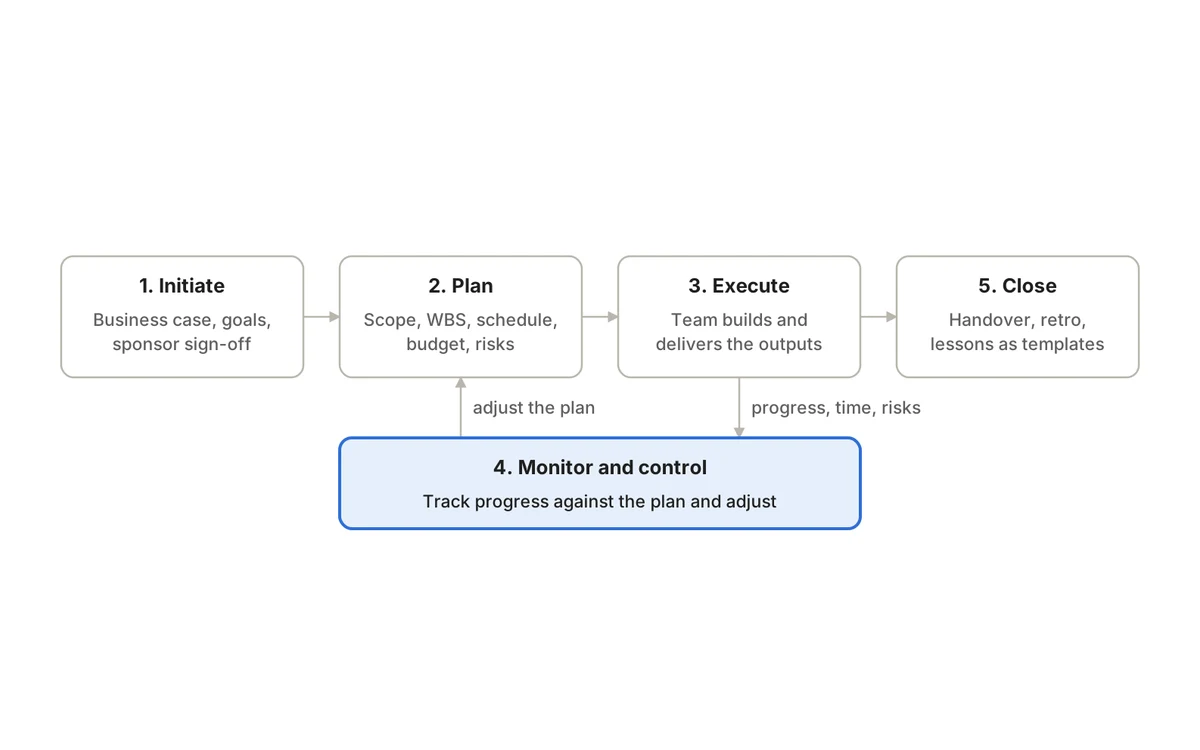
Every project, from a two-week campaign to a two-year build, moves through the same five phases. The one most teams get wrong is phase 4: monitoring is not a step after execution, it runs alongside it the whole time.
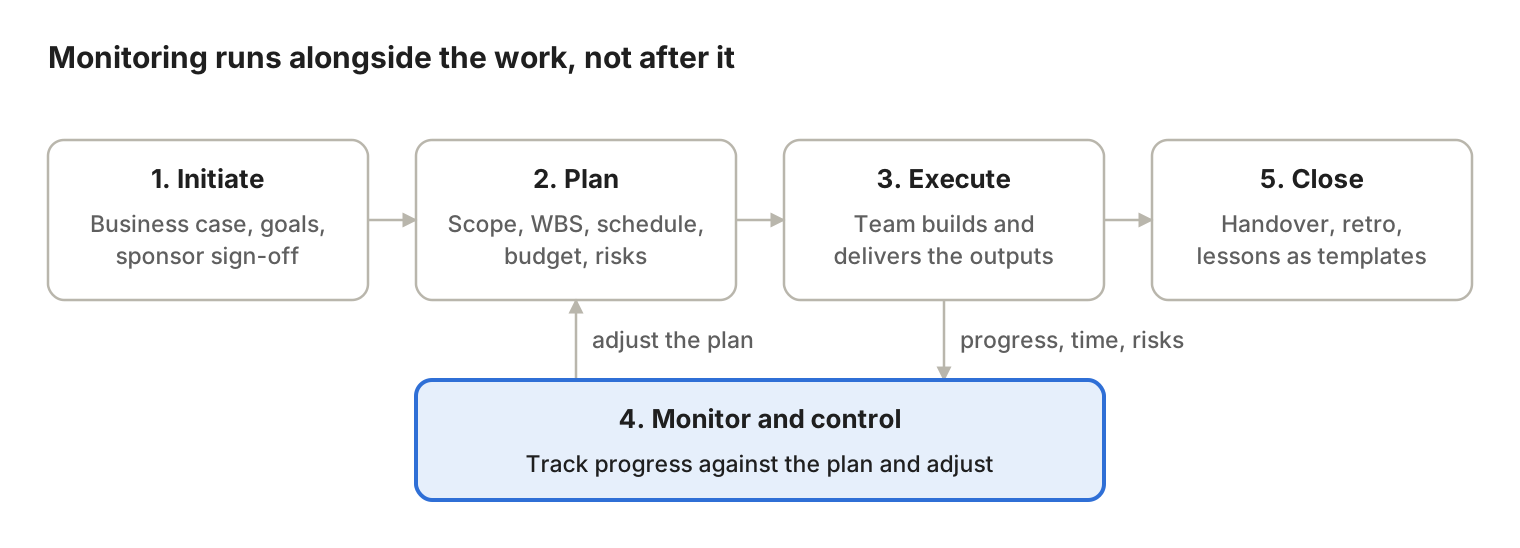
Work flows left to right, but monitoring feeds progress back into the plan whenever reality changes.
1. Initiate
- The question it answers
- Is this worth doing, and what does success look like?
- What you produce
- Business case, project charter, named sponsor
2. Plan
- The question it answers
- How exactly will we get there?
- What you produce
- Scope statement, work breakdown, schedule, budget, risk list
3. Execute
- The question it answers
- Are we building the right things, in the right order?
- What you produce
- Deliverables, status updates, decisions
4. Monitor and control
- The question it answers
- Are we on track, and what needs to change?
- What you produce
- Progress dashboards, change requests, updated forecasts
5. Close
- The question it answers
- Did we deliver, and what did we learn?
- What you produce
- Sign-off, retrospective, reusable templates
| Phase | The question it answers | What you produce |
|---|---|---|
| 1. Initiate | Is this worth doing, and what does success look like? | Business case, project charter, named sponsor |
| 2. Plan | How exactly will we get there? | Scope statement, work breakdown, schedule, budget, risk list |
| 3. Execute | Are we building the right things, in the right order? | Deliverables, status updates, decisions |
| 4. Monitor and control | Are we on track, and what needs to change? | Progress dashboards, change requests, updated forecasts |
| 5. Close | Did we deliver, and what did we learn? | Sign-off, retrospective, reusable templates |
Agile teams run phases 2 to 4 in short loops called sprints. Waterfall teams run them once, in order. The phases are the same; the rhythm differs. Our guide to the five project management phases walks through each one with examples.
The building blocks: constraints, roles and key terms
The triple constraint
Every project balances three levers: scope (what you deliver), time (when you deliver it) and cost (what it takes). Pull one and the others move. Add features without moving the deadline, and you need more people or money. Cut the budget without cutting scope, and the date slips. Squeeze all three, and quality pays the price.
A useful habit: when someone asks for a change, reply with “Sure, which of the other two should move?” It turns scope creep into a conscious trade-off.
Who does what on a project
Sponsor
- What they own
- Funding, priority calls, removing organisational blockers
- Typical on a small team
- Founder, department head
Project manager
- What they own
- The plan, the schedule, risks, communication and delivery
- Typical on a small team
- Team lead or senior member
Team members
- What they own
- Doing the work and flagging blockers early
- Typical on a small team
- Everyone assigned tasks
Stakeholders
- What they own
- Requirements, feedback and sign-off
- Typical on a small team
- Client, other departments, leadership
Product owner (Agile)
- What they own
- Deciding what gets built next and why
- Typical on a small team
- Product manager or client lead
QA / reviewers
- What they own
- Checking deliverables meet the agreed standard
- Typical on a small team
- Testers, editors, compliance
| Role | What they own | Typical on a small team |
|---|---|---|
| Sponsor | Funding, priority calls, removing organisational blockers | Founder, department head |
| Project manager | The plan, the schedule, risks, communication and delivery | Team lead or senior member |
| Team members | Doing the work and flagging blockers early | Everyone assigned tasks |
| Stakeholders | Requirements, feedback and sign-off | Client, other departments, leadership |
| Product owner (Agile) | Deciding what gets built next and why | Product manager or client lead |
| QA / reviewers | Checking deliverables meet the agreed standard | Testers, editors, compliance |
If you are unsure who decides what, a RACI chart (Responsible, Accountable, Consulted, Informed) settles it in one table.
10 project management terms worth knowing
Scope
- Plain-English meaning
- The agreed boundary of what the project will and will not deliver
Scope creep
- Plain-English meaning
- Extra work that sneaks in without adjusting time or budget
Deliverable
- Plain-English meaning
- A tangible output, such as a design file, a feature or a report
Milestone
- Plain-English meaning
- A checkpoint in time, such as “beta ready”, with no duration of its own
Work breakdown structure (WBS)
- Plain-English meaning
- The project split into smaller, assignable pieces of work
Dependency
- Plain-English meaning
- A task that cannot start until another one finishes
Critical path
- Plain-English meaning
- The longest chain of dependent tasks; any delay here delays the whole project
Baseline
- Plain-English meaning
- The approved plan you measure progress against
Backlog
- Plain-English meaning
- A ranked list of work waiting to be done, common in Agile teams
Sprint
- Plain-English meaning
- A short, fixed period (usually 1 to 4 weeks) in which a team completes a set of work
| Term | Plain-English meaning |
|---|---|
| Scope | The agreed boundary of what the project will and will not deliver |
| Scope creep | Extra work that sneaks in without adjusting time or budget |
| Deliverable | A tangible output, such as a design file, a feature or a report |
| Milestone | A checkpoint in time, such as “beta ready”, with no duration of its own |
| Work breakdown structure (WBS) | The project split into smaller, assignable pieces of work |
| Dependency | A task that cannot start until another one finishes |
| Critical path | The longest chain of dependent tasks; any delay here delays the whole project |
| Baseline | The approved plan you measure progress against |
| Backlog | A ranked list of work waiting to be done, common in Agile teams |
| Sprint | A short, fixed period (usually 1 to 4 weeks) in which a team completes a set of work |
Project management methodologies: which one fits your team?
The right methodology depends on two things: how certain your requirements are, and whether your work is one defined deliverable or a steady stream of requests. Find your spot on the grid below.
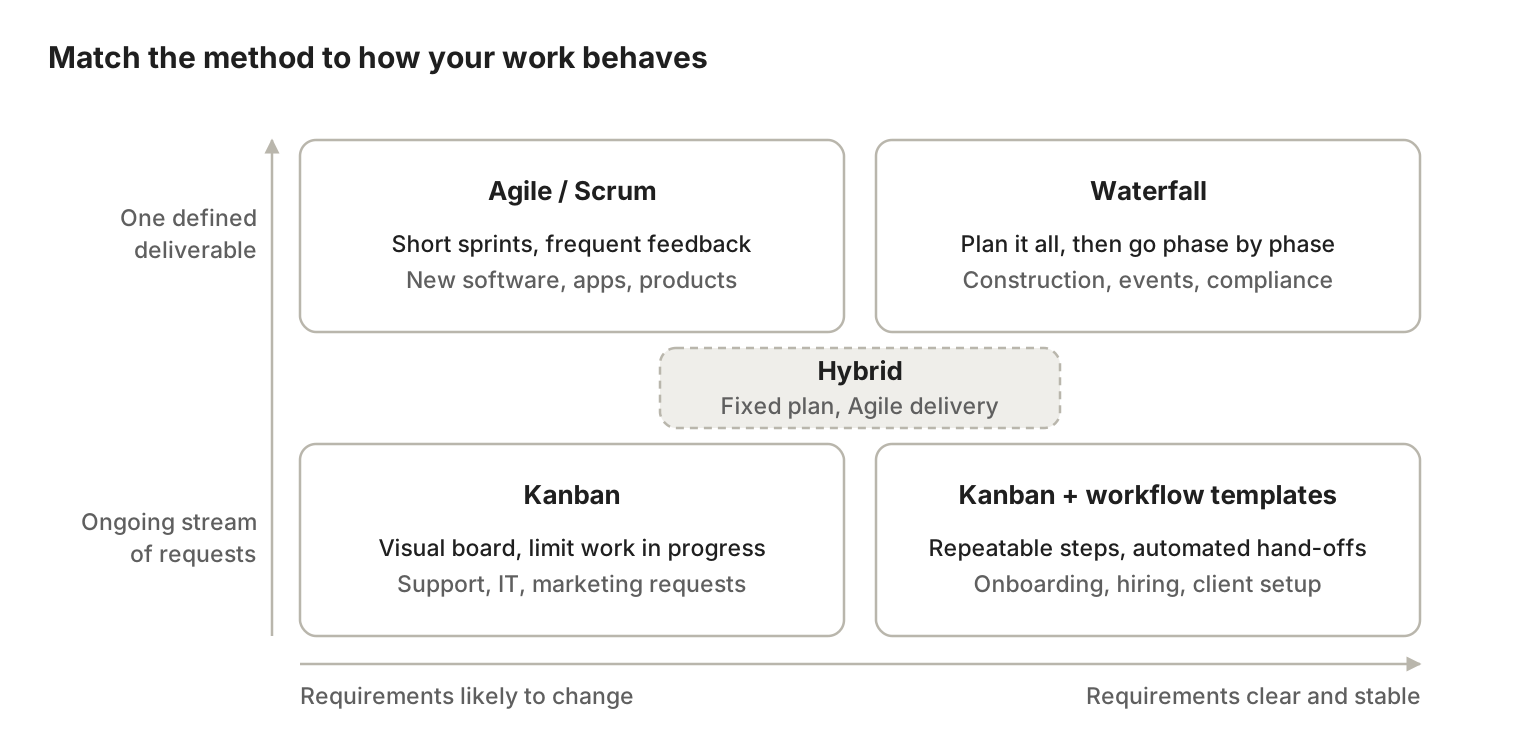
Stable, well-defined projects suit Waterfall; changing requirements suit Agile; ongoing requests suit Kanban. Hybrid sits in the middle for teams with fixed deadlines but evolving detail. For a deeper side-by-side, see Agile vs Waterfall and Kanban vs Scrum.
Waterfall
- How it works
- Plan everything up front, then finish each phase before starting the next
- Best for
- Construction, events, regulated or fixed-price work
- Watch out for
- Late changes are expensive; problems surface late
Agile
- How it works
- Deliver in small increments and adjust after each one
- Best for
- Software, digital products, anything needing user feedback
- Watch out for
- Final cost and date are harder to promise up front
Scrum
- How it works
- An Agile framework with 1 to 4 week sprints, set roles and regular reviews
- Best for
- Product and engineering teams shipping in increments
- Watch out for
- Ceremonies can feel heavy for very small teams
Kanban
- How it works
- Cards move across a board; limits on work in progress keep flow steady
- Best for
- Support, IT operations, marketing and content requests
- Watch out for
- Without priorities, the board becomes a dumping ground
Hybrid
- How it works
- Waterfall-style milestones and budget with Agile delivery inside
- Best for
- Client projects, enterprise rollouts, mixed teams
- Watch out for
- Needs clear rules on which parts are fixed and which flex
| Methodology | How it works | Best for | Watch out for |
|---|---|---|---|
| Waterfall | Plan everything up front, then finish each phase before starting the next | Construction, events, regulated or fixed-price work | Late changes are expensive; problems surface late |
| Agile | Deliver in small increments and adjust after each one | Software, digital products, anything needing user feedback | Final cost and date are harder to promise up front |
| Scrum | An Agile framework with 1 to 4 week sprints, set roles and regular reviews | Product and engineering teams shipping in increments | Ceremonies can feel heavy for very small teams |
| Kanban | Cards move across a board; limits on work in progress keep flow steady | Support, IT operations, marketing and content requests | Without priorities, the board becomes a dumping ground |
| Hybrid | Waterfall-style milestones and budget with Agile delivery inside | Client projects, enterprise rollouts, mixed teams | Needs clear rules on which parts are fixed and which flex |
Three questions settle most choices:
- 1.Will the requirements change once work starts? Yes points to Agile or Scrum; no points to Waterfall.
- 2.Is the work a one-off deliverable or a continuous stream? A stream points to Kanban.
- 3.Do you owe someone a fixed date and budget? If yes, but the details will evolve, choose Hybrid.
Tip: you do not have to pick one forever. A good project management tool lets different teams use boards, sprints or timelines on the same underlying data.
7 common project management challenges (and how to fix them)
Most projects do not fail in one dramatic moment; they slip a day at a time. When complexity is poorly managed, PMI’s 2026 survey found the most common fallout was missed deadlines (35%), slow stakeholder decisions (34%) and budget overruns (28%). Here is how to spot each problem early.
Scope creep
- Early warning sign
- “Small” requests arrive by chat and skip the plan
- Fix
- Log every change request and agree which lever (time, cost or scope) moves
Unclear goals
- Early warning sign
- Two people describe “done” differently
- Fix
- Write success criteria at kickoff and get the sponsor to sign them
Slow decisions
- Early warning sign
- Tasks sit in “waiting for approval” for days
- Fix
- Name one decision-maker per area and set response times
Overloaded people
- Early warning sign
- The same names appear on every urgent task
- Fix
- Check workload before assigning; move or delay lower-priority work
Status-report overload
- Early warning sign
- Managers spend hours each week chasing updates
- Fix
- Keep work in one shared tool so dashboards update themselves
Tool sprawl
- Early warning sign
- Tasks in one app, docs in another, time in a spreadsheet
- Fix
- Consolidate planning, docs, time and testing in one platform
Risks spotted too late
- Early warning sign
- Problems surface in review meetings, not before
- Fix
- Keep a simple risk register and review it weekly
| Challenge | Early warning sign | Fix |
|---|---|---|
| Scope creep | “Small” requests arrive by chat and skip the plan | Log every change request and agree which lever (time, cost or scope) moves |
| Unclear goals | Two people describe “done” differently | Write success criteria at kickoff and get the sponsor to sign them |
| Slow decisions | Tasks sit in “waiting for approval” for days | Name one decision-maker per area and set response times |
| Overloaded people | The same names appear on every urgent task | Check workload before assigning; move or delay lower-priority work |
| Status-report overload | Managers spend hours each week chasing updates | Keep work in one shared tool so dashboards update themselves |
| Tool sprawl | Tasks in one app, docs in another, time in a spreadsheet | Consolidate planning, docs, time and testing in one platform |
| Risks spotted too late | Problems surface in review meetings, not before | Keep a simple risk register and review it weekly |
The last three are not people problems; they are system problems. When information lives in one place, half of these warning signs become visible automatically. Our guides to project risk management and project management KPIs show how to set that up.
How to choose project management software: an 8-point checklist
The right tool is the one your whole team will actually use, at a price that does not grow every time you need a new capability. Spreadsheets work for a single small project. Once you run several projects, share work across teams or report to clients, you need a dedicated platform. Wellingtone’s 2026 report found 22% of organisations still plan in Excel, which is one reason so much time goes into manual reporting.
Use this checklist when you compare tools:
- 1.Views for every working style. Boards for the team, lists for detail, timelines or Gantt charts for managers, dashboards for leadership, all from the same data.
- 2.Agile and traditional support. Sprints, backlogs and Kanban, plus milestones and dependencies, so you are not locked into one methodology.
- 3.Documentation next to the work. Requirements, specs and meeting notes should link to the tasks they describe, not sit in a separate wiki.
- 4.Built-in time tracking. Timesheets and workload views without buying a separate add-on.
- 5.Testing and QA (for software teams). Test cases, test runs and defects in the same workflow as development.
- 6.AI that does work, not just chat. Look for AI that can create and update tasks, summarise status and flag risks using your real project data.
- 7.Easy migration and integrations. An import path from your current tool (for example, Jira) plus API, webhooks and SSO.
- 8.Total cost of the stack. Add up every subscription you need for planning, docs, time, testing and AI. The cheapest headline price can become the most expensive stack once add-ons are included.
One more test: count the apps your team opens to finish a single task. Asana’s own research found the average employee switches between 10 tools a day. Every switch costs focus.
How QuikProjects makes project management simpler
QuikProjects is an AI-first project and work management platform that puts planning, documentation, time tracking, task management, test management and AI agents in one workspace. Instead of a project tool plus a wiki, a timesheet app, a QA tool and a separate AI assistant, your team gets one product, one login and one source of truth. For the full product tour, read What is QuikProjects?
Everything in one place
Projects, sprints, backlogs, Kanban, dependencies
- Typical tool stack
- Jira or similar
- QuikProjects
- Included
Requirements, specs, meeting notes
- Typical tool stack
- Confluence or a separate wiki
- QuikProjects
- Included, linked to the work
Timesheets and workload
- Typical tool stack
- Tempo or another add-on
- QuikProjects
- Included
Day-to-day task lists
- Typical tool stack
- Planner or a to-do app
- QuikProjects
- Included
Test cases, test runs, defects
- Typical tool stack
- TestRail or similar
- QuikProjects
- Included
AI that acts on project data
- Typical tool stack
- A separate AI tool or integration
- QuikProjects
- Included, via MCP-connected AI agents
| What you need | Typical tool stack | QuikProjects |
|---|---|---|
| Projects, sprints, backlogs, Kanban, dependencies | Jira or similar | Included |
| Requirements, specs, meeting notes | Confluence or a separate wiki | Included, linked to the work |
| Timesheets and workload | Tempo or another add-on | Included |
| Day-to-day task lists | Planner or a to-do app | Included |
| Test cases, test runs, defects | TestRail or similar | Included |
| AI that acts on project data | A separate AI tool or integration | Included, via MCP-connected AI agents |
Quikit estimates a typical Jira-based stack costs $50 or more per user per month once these add-ons are included. QuikProjects is free forever for up to 10 users, and the Pro plan is $5 per user per month (pricing). To compare tools on total cost rather than list price, use our project management software pricing guide.
How each phase works in QuikProjects
- Initiate and plan: capture ideas and requests, turn them into epics and stories, rank the backlog, estimate and plan sprints, and map dependencies on the timeline.
- Execute: run Scrum, Kanban or your own custom workflow. Each person picks the view that suits them: Board, Kanban, List, Table, Timeline, Backlog, Epics or Summary.
- Test and release: QA writes versioned test cases, executes runs and logs defects against the same work items engineers are building, then rolls completed work into tracked releases.
- Monitor: the Summary view shows project health, priorities, workload and delivery status live, so status reports stop being a monthly chore.
- Close: retrospectives, decisions and runbooks stay in the same workspace, ready to become the template for your next project.
AI that helps do the work
QuikProjects uses MCP (Model Context Protocol) to connect AI agents with authorised project data and business tools. Agents can retrieve information, create tasks, update work and automate repetitive steps, rather than only answering questions in a chat window. Read more in AI in project management: use cases, risks and examples.
Built to connect
QuikProjects works on its own, with GitHub, a REST API, webhooks, SSO and a built-in Jira migration path. It also connects natively with the wider Quikit suite, so projects can sit alongside customer records in QuikCRM, people data in QuikPeople and dashboards in QuikInsights.
Ready to try it? Start free with QuikProjects and run your next project in one connected workspace. Moving from Jira? Ask the team about migration.
How to manage a project: a 7-step plan you can start today
You do not need a certification to run a well-managed project. Follow these seven steps. The example alongside each one is a 6-person team relaunching a company website in eight weeks. For a fuller walkthrough with a copyable template, see how to create a project plan.
- 1.Write a one-paragraph brief. State the goal, the deadline, the budget and how you will measure success. Example: “Relaunch the website by 15 March to lift demo requests by 20%. Budget: $8,000.”
- 2.Agree the scope, in and out. List what is included and, just as important, what is not. Example: in scope are 12 pages and a new blog template; out of scope is a customer portal.
- 3.Break the work down. Split the goal into deliverables, then into tasks small enough to finish in a few days. Give every task one owner. Example: design, copy, development, SEO and QA, each with its own tasks.
- 4.Map dependencies and set milestones. Decide what must happen before what, then mark three to five checkpoints. Example: copy before design sign-off; milestones for wireframes, staging site and launch.
- 5.Pick your way of working. Choose Waterfall, Agile, Kanban or a hybrid using the chooser above, and set a check-in rhythm. Example: two-week sprints with a 15-minute stand-up three times a week.
- 6.Track progress in one shared place. Keep tasks, documents and time in a single tool so status is visible without chasing anyone. Review risks every week. Example: a board for the team and a summary dashboard for the founder.
- 7.Close it out properly. Confirm the deliverables, run a 30-minute retrospective and save what worked as a template. Example: the retro shows QA started too late, so the next template adds a test phase in week five.
Want to skip the setup? QuikProjects gives you backlogs, timelines, docs, time tracking and testing in one workspace, free for teams of up to 10.
Frequently asked questions
What is project management in simple words?
Project management is organising a one-time piece of work so it gets done on time, within budget and to the expected standard. It means deciding what needs to happen, who does it and by when, then tracking progress and adjusting when plans change.
What are the 5 phases of project management?
The five phases are initiation, planning, execution, monitoring and controlling, and closing. Initiation confirms the project is worth doing, planning maps the work, execution delivers it, monitoring runs alongside to keep it on track, and closing hands over results and captures lessons.
What are the main project management methodologies?
The most common are Waterfall, Agile, Scrum, Kanban and hybrid approaches. Waterfall plans everything up front and moves phase by phase. Agile and Scrum deliver in short cycles. Kanban manages a continuous flow of work. Hybrid mixes up-front planning with Agile delivery.
What is the difference between Agile and Waterfall?
Waterfall fixes scope early and completes each phase before the next begins, which suits stable, well-defined projects. Agile delivers in short sprints and expects requirements to change, which suits software and products that need regular user feedback. Many teams now combine the two.
Do you need a certification to manage projects?
No. Many projects are run by team leads, founders and specialists without a formal title. Certifications such as PMP, CAPM or PRINCE2 help with careers and large, governed projects, but clear goals, owners and a shared tracking system matter more day to day.
What is the difference between project, program and portfolio management?
A project delivers one defined outcome. A program coordinates several related projects toward a larger goal, such as a company-wide digital transformation. A portfolio is the full set of projects and programs an organisation chooses to invest in, prioritised against strategy.
What is the best project management software for small teams?
The best choice is a tool your team adopts quickly, that covers planning, documentation and time tracking without paid add-ons, and that stays affordable as you grow. QuikProjects is free forever for up to 10 users and includes docs, time tracking and test management.
How is AI used in project management?
AI now summarises project status, drafts tasks from briefs, flags at-risk work and automates routine updates. The newest tools connect AI agents directly to project data, so they can create and update work items rather than only answer questions.
Is QuikProjects a Jira alternative?
Yes. QuikProjects covers projects, issues, sprints, backlogs and Kanban like Jira, and also includes documentation, time tracking, task management, test management and MCP-connected AI in the same product. It supports migration from Jira, so teams can move without rebuilding their work. See the full QuikProjects vs Jira comparison and our Jira migration checklist.
The bottom line
Project management is not paperwork. It is the habit of agreeing what “done” means, giving every piece of work an owner, and keeping progress visible so problems surface while they are still small. Pick the methodology that matches how certain your requirements are, follow the five phases, and keep everything in one shared place.
The tool matters more than most teams expect. When plans, documents, time and testing live in separate apps, you pay twice: once in subscriptions and again in hours spent stitching updates together.
Run your next project in one connected workspace. Try QuikProjects free for up to 10 users, no credit card needed.
Sources
See it running on your business.
A walkthrough built around how your team works today.