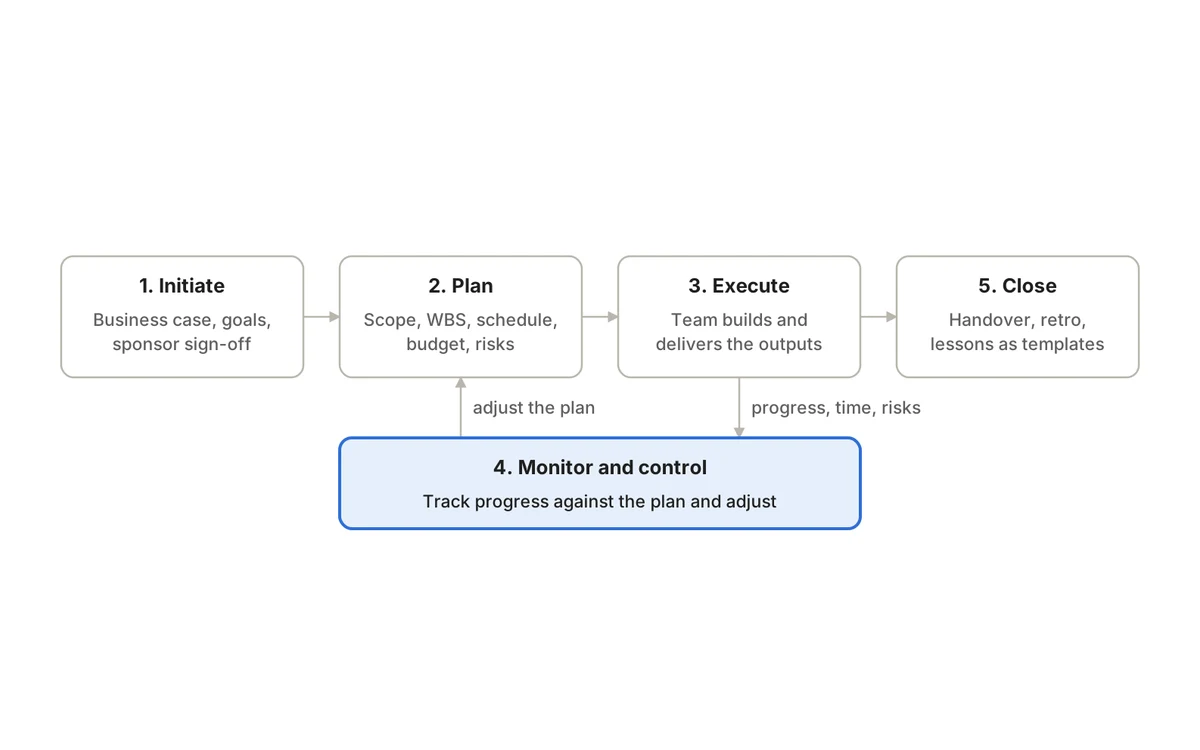
The five phases of project management are initiation, planning, execution, monitoring and control, and closing. Each phase exists to settle a different kind of decision: whether to do the project at all, how to do it, doing it, keeping it on course, and finishing it properly. Skip a decision early and it comes back later, usually at a higher price.
This guide goes phase by phase. For each one you will find what it is for, the activities and outputs that matter, a worked example from a different kind of team, the mistakes that most often derail it, and the exit questions to answer before moving on. If you want the wider picture of roles, methodologies and tools first, start with our complete guide to project management.
The five phases at a glance
1. Initiation
- Decision it settles
- Should we do this, and why?
- Key outputs
- Charter, sponsor, success measures
- Ready to move on when…
- The sponsor approves the charter
2. Planning
- Decision it settles
- How will we deliver it?
- Key outputs
- Scope, work breakdown, schedule, budget, risk register
- Ready to move on when…
- The team and sponsor agree a baseline
3. Execution
- Decision it settles
- Are we producing the right deliverables?
- Key outputs
- Deliverables, decisions, issue log
- Ready to move on when…
- Deliverables meet acceptance criteria
4. Monitoring and control
- Decision it settles
- Are we on track, and what must change?
- Key outputs
- Variance reports, approved changes, forecasts
- Ready to move on when…
- Runs until closing; never “finished” early
5. Closing
- Decision it settles
- Did we deliver, and what did we learn?
- Key outputs
- Acceptance, handover, lessons, archive
- Ready to move on when…
- Everything is signed off and owned
| Phase | Decision it settles | Key outputs | Ready to move on when… |
|---|---|---|---|
| 1. Initiation | Should we do this, and why? | Charter, sponsor, success measures | The sponsor approves the charter |
| 2. Planning | How will we deliver it? | Scope, work breakdown, schedule, budget, risk register | The team and sponsor agree a baseline |
| 3. Execution | Are we producing the right deliverables? | Deliverables, decisions, issue log | Deliverables meet acceptance criteria |
| 4. Monitoring and control | Are we on track, and what must change? | Variance reports, approved changes, forecasts | Runs until closing; never “finished” early |
| 5. Closing | Did we deliver, and what did we learn? | Acceptance, handover, lessons, archive | Everything is signed off and owned |
The most important thing the table cannot show is overlap. Execution and monitoring run at the same time, planning is revisited whenever something material changes, and in large projects different workstreams can sit in different phases at once. Think of the phases as a set of jobs that must all get done, not a relay race where each runner waits for the baton.
Where the five-phase model comes from
The five names come from the Project Management Institute’s PMBOK Guide, which for several editions organized project work into five process groups. The Seventh Edition (2021) moved away from that structure in favor of principles and performance domains. The Eighth Edition, released at the end of 2025, brought the five back as “Focus Areas” and describes them as applying to predictive, agile and hybrid projects alike.
Two practical takeaways follow from that history. First, the model is a widely recognized vocabulary, which makes it useful for agreeing expectations with sponsors, clients and other departments. Second, PMI itself frames the five as areas of activity rather than a rigid sequence, which is how experienced teams already use them.
Phase 1: Initiation
Initiation is a go or no-go decision. Its job is to state the problem in plain language, show why solving it now is worth the cost, and give someone the authority to spend time and money on it. A good initiation is short; a missing one is expensive, because every later disagreement about priority or scope traces back to it.
What happens in initiation
- Describe the problem or opportunity and who feels it.
- Define the outcome you want, not just the thing you will build. “Cut average ticket resolution time” is an outcome; “new helpdesk tool” is an output.
- Name the sponsor, the person who funds the work and makes priority calls.
- Identify stakeholders: the people affected, the people who must approve, and the people whose cooperation you need.
- Record known constraints (budget ceiling, fixed dates, regulations) and the assumptions you are making.
- Decide how success will be measured and who will judge it.
Outputs
A project charter, which can be a single page: problem, goal, success measures, sponsor, project lead, high-level scope, key constraints and the authority the lead has. Larger organizations may also require a business case that compares options, including doing nothing.
Example: replacing an IT helpdesk tool
An IT manager at a 300-person company wants to replace an aging ticketing system. The charter states the problem (tickets lost between email and the old tool, no reporting), the outcome (every request tracked from receipt to resolution, with weekly reporting to the operations director), the sponsor (the operations director), the constraint (the contract with the current vendor ends in five months) and the success measure (all support requests logged in the new system within one month of go-live).
Common initiation mistakes
- Starting work before a sponsor is named, so nobody can break ties later.
- Writing success measures nobody can check, such as “improve the customer experience”.
- Treating the charter as a formality and never looking at it again. It is the reference point for every later scope debate.
Phase 2: Planning
Planning translates the approved goal into work that people can pick up. The aim is a plan that is detailed enough to coordinate dependencies and expose risk, and honest about what is still unknown. A plan that pretends to certainty it does not have is worse than a short one, because people make commitments based on it.
What happens in planning
- Define scope, acceptance criteria and explicit exclusions.
- Break deliverables into a work breakdown structure: smaller pieces, each with one accountable owner.
- Estimate effort and check it against real availability, including leave and other commitments.
- Sequence the work, map dependencies and find the critical path, the chain of tasks where any delay moves the end date.
- Set milestones at meaningful decision points, not on every task.
- Agree the budget, a risk register, a communication rhythm and how changes will be approved.
Outputs
A scope statement, the task list or backlog, a schedule with milestones, a budget, a risk register and a short communication and change-control plan. Once agreed, these form the baseline you will measure against. Our step-by-step guide on how to create a project plan includes a one-page template you can copy.
Example: an agency product-launch campaign
A marketing agency is planning a six-week launch campaign for a client’s new kitchen appliance. Scope covers a landing page, three video cut-downs, paid social and a press kit; it excludes retail point-of-sale material. The plan reveals a dependency that matters: the videos cannot be edited until the client approves product shots, and the client’s legal team needs five working days to review claims. That review becomes a milestone with its own date, and the agency adds a risk entry for late legal feedback, with the mitigation of submitting claims copy in week one.
Common planning mistakes
- Planning only the happy path, with no slack for review cycles, approvals or rework.
- Estimating as if everyone is available full time on this project.
- Leaving exclusions unwritten, so every “small extra” becomes a debate.
Phase 3: Execution
Execution is where the deliverables get made. The project lead’s job shifts from designing the plan to clearing the path: making decisions quickly, resolving blockers, coordinating hand-offs and keeping stakeholders informed. Most of the budget is usually spent here, which is why the earlier phases matter so much.
What happens in execution
- Team members complete tasks and flag blockers early.
- The lead coordinates dependencies, especially hand-offs between people or suppliers.
- Decisions get made and recorded where the team can find them.
- Quality checks happen as work is produced, not only at the end.
- Stakeholders receive regular, brief updates against the plan.
Example: an office fit-out
A facilities team is fitting out a new office floor. Execution means coordinating electricians, data cabling, furniture delivery and IT setup. The cabling contractor cannot start until partition walls are up; furniture cannot arrive until cabling is tested. The lead holds a 15-minute site check-in twice a week, logs each decision (for example, moving a meeting room to free space for a server cabinet) and updates the schedule the same day.
Common execution mistakes
- Letting decisions live in chat threads and meetings where nobody can find them later.
- Allowing urgent but unplanned requests to quietly displace milestone work.
- Leaving quality checks until the end, when fixes are slow and costly.
Phase 4: Monitoring and control
Monitoring compares what is happening with what was planned; control is what you do about the difference. It starts on the first day of execution and continues until the project closes. Its output should be decisions, such as re-sequencing work, approving or rejecting a change, or escalating a risk, not just a report.
What to monitor
Schedule
- Question to ask
- Are milestones on track?
- Typical warning signal
- Critical-path tasks finishing later than planned
Scope
- Question to ask
- Is work being added without approval?
- Typical warning signal
- New tasks with no linked change decision
Cost and effort
- Question to ask
- Are we spending as planned?
- Typical warning signal
- Actual hours or spend running ahead of progress
Quality
- Question to ask
- Are deliverables passing review first time?
- Typical warning signal
- Rising rework or failed checks
Risk
- Question to ask
- Are known risks changing?
- Typical warning signal
- Risks moving from possible to likely
Capacity
- Question to ask
- Is anyone overloaded?
- Typical warning signal
- The same names on every urgent task
| Area | Question to ask | Typical warning signal |
|---|---|---|
| Schedule | Are milestones on track? | Critical-path tasks finishing later than planned |
| Scope | Is work being added without approval? | New tasks with no linked change decision |
| Cost and effort | Are we spending as planned? | Actual hours or spend running ahead of progress |
| Quality | Are deliverables passing review first time? | Rising rework or failed checks |
| Risk | Are known risks changing? | Risks moving from possible to likely |
| Capacity | Is anyone overloaded? | The same names on every urgent task |
Choose a small number of measures that would change a decision if they moved. Our guide to project management KPIs covers which metrics help and which only create reporting work, and our project risk management guide explains how to keep a risk register that people actually review.
Example: a SaaS feature behind schedule
A product team’s billing feature depends on a payments API change from another team. Two weeks in, that dependency is slipping. Monitoring spots it because the dependent tasks have not started. Control means a decision: the lead and product owner agree to ship invoicing first and move card-update flows to the following release, and the sponsor approves the revised milestone. The original baseline stays on record, so the variance is visible rather than hidden.
Common monitoring mistakes
- Treating monitoring as a monthly report instead of a weekly habit.
- Quietly moving dates or trimming scope so a dashboard stays green.
- Accepting change requests without asking which of time, cost or scope will move to absorb them.
If writing updates eats hours every week, our status report template shows how to keep them short and drawn from live data.
Phase 5: Closing
Closing confirms that the project is finished and that nothing is left without an owner. It is the phase teams skip most often, because the next project is already waiting. Skipping it means unresolved issues follow the team around and lessons are lost.
What happens in closing
- Get formal acceptance of the deliverables from the sponsor or client.
- Hand over to whoever runs the result: operations, support, the client or a maintenance team.
- Assign owners to any open issues or follow-up work.
- Close contracts, release people and finalize budgets.
- Run a retrospective and turn findings into something reusable: a checklist, a template or a revised estimating assumption.
- Archive decisions and documentation where the next team can find them.
Example: an IT services handover
An IT services firm finishes migrating a client’s file servers to the cloud. Closing includes the client’s written acceptance, a runbook handed to the client’s internal IT team, two known issues assigned to the support desk with due dates, and a retrospective that finds permissions mapping took twice as long as estimated. The firm updates its migration template to schedule a dedicated permissions workshop in week one. Keeping decisions and runbooks attached to the work is covered in our project documentation guide.
Common closing mistakes
- Assuming acceptance because nobody complained.
- Running a retrospective but never changing anything as a result.
- Leaving documentation scattered across personal drives and inboxes.
Phase gates: questions to answer before moving on
A phase gate is a short check that the decisions of one phase are made before the next phase depends on them. On a small project it can be a 20-minute conversation; on a regulated or high-budget project it may be a formal review with evidence.
Initiation → Planning
- Questions to answer
- Is the problem clear? Is there a sponsor? Can we measure success?
- Usually signed off by
- Sponsor
Planning → Execution
- Questions to answer
- Are scope, owners, dependencies and milestones agreed? Are top risks owned?
- Usually signed off by
- Sponsor and project lead
Execution → Closing
- Questions to answer
- Do deliverables meet acceptance criteria? Are open issues assigned?
- Usually signed off by
- Sponsor or client
Closing complete
- Questions to answer
- Is handover done? Are lessons captured in a reusable form?
- Usually signed off by
- Project lead
| Gate | Questions to answer | Usually signed off by |
|---|---|---|
| Initiation → Planning | Is the problem clear? Is there a sponsor? Can we measure success? | Sponsor |
| Planning → Execution | Are scope, owners, dependencies and milestones agreed? Are top risks owned? | Sponsor and project lead |
| Execution → Closing | Do deliverables meet acceptance criteria? Are open issues assigned? | Sponsor or client |
| Closing complete | Is handover done? Are lessons captured in a reusable form? | Project lead |
How much effort each phase deserves
There is no fixed percentage for each phase. Scale the depth of initiation and planning to the cost of being wrong. A two-week internal campaign might need a half-page brief and a task list; a hospital IT system rollout needs formal sign-offs, a detailed risk register and documented testing.
Small internal (2–6 weeks)
- Initiation
- One-paragraph brief
- Planning
- Task list with owners and dates
- Monitoring rhythm
- Weekly check
- Closing
- 30-minute retro
Client or cross-team (2–6 months)
- Initiation
- One-page charter
- Planning
- Scope, schedule, budget, risk register
- Monitoring rhythm
- Weekly review, monthly sponsor update
- Closing
- Acceptance, handover, retro
High-risk or regulated
- Initiation
- Business case and charter
- Planning
- Full baseline with change control
- Monitoring rhythm
- Formal gate reviews plus weekly tracking
- Closing
- Formal acceptance, audit trail, lessons report
| Project type | Initiation | Planning | Monitoring rhythm | Closing |
|---|---|---|---|---|
| Small internal (2–6 weeks) | One-paragraph brief | Task list with owners and dates | Weekly check | 30-minute retro |
| Client or cross-team (2–6 months) | One-page charter | Scope, schedule, budget, risk register | Weekly review, monthly sponsor update | Acceptance, handover, retro |
| High-risk or regulated | Business case and charter | Full baseline with change control | Formal gate reviews plus weekly tracking | Formal acceptance, audit trail, lessons report |
How the phases change in Agile, Waterfall and hybrid projects
The phases do not disappear in Agile; they change rhythm. In a Waterfall project, planning is done largely up front and the project moves through gates once. In Agile, initiation still happens once (a product vision or goal, a sponsor, a budget), but planning, execution and monitoring repeat every iteration. In Scrum, for example, the 2020 Scrum Guide sets Sprints of one month or less, each with Sprint Planning, a Daily Scrum, a Sprint Review and a Sprint Retrospective. That is planning, monitoring and a small act of closing, repeated.
Initiation
- Waterfall
- Once, formal
- Agile (e.g. Scrum)
- Once: vision, goal, funding
- Hybrid
- Once, formal
Planning
- Waterfall
- Detailed, up front
- Agile (e.g. Scrum)
- Rolling: product, release and sprint level
- Hybrid
- Milestones fixed up front, detail planned per iteration
Execution
- Waterfall
- By phase or workstream
- Agile (e.g. Scrum)
- In short iterations
- Hybrid
- Iterations inside fixed milestones
Monitoring
- Waterfall
- Against the baseline
- Agile (e.g. Scrum)
- Every sprint and every day
- Hybrid
- Both: milestone baseline and sprint progress
Closing
- Waterfall
- At the end
- Agile (e.g. Scrum)
- Retro every sprint, final close at the end
- Hybrid
- Gate reviews at milestones, final close at the end
| Phase | Waterfall | Agile (e.g. Scrum) | Hybrid |
|---|---|---|---|
| Initiation | Once, formal | Once: vision, goal, funding | Once, formal |
| Planning | Detailed, up front | Rolling: product, release and sprint level | Milestones fixed up front, detail planned per iteration |
| Execution | By phase or workstream | In short iterations | Iterations inside fixed milestones |
| Monitoring | Against the baseline | Every sprint and every day | Both: milestone baseline and sprint progress |
| Closing | At the end | Retro every sprint, final close at the end | Gate reviews at milestones, final close at the end |
Choosing between these approaches is a decision in its own right. Our comparison of Agile vs Waterfall walks through the criteria and examples.
Where QuikProjects fits
Each phase produces information that the next phase depends on, so it helps when that information lives in one place. In QuikProjects, teams can keep the charter and specs in the project’s wiki next to the work, plan backlogs, sprints and a timeline with real dependencies and conflict warnings, and track execution on boards, lists or spreadsheet-style views. For monitoring, planned-versus-actual hours come from approved timesheets, the executive report shows on-time delivery and slipping work team by team, and on Premium and Pro the AI Project Assistant summarizes sprints and flags risks. At closing, decisions, runbooks and retrospective notes stay in the same workspace for the next project.
Frequently asked questions
Is monitoring and control really a separate phase?
It is listed as one of the five, but it does not wait its turn. Monitoring begins as soon as execution starts and continues until closing. Treating it as a step after execution is one of the most common reasons problems are discovered too late to fix cheaply.
What is the difference between project phases and a project life cycle?
The five phases are a generic set of management activities that apply to almost any project. A life cycle describes the specific stages of a particular kind of project, such as design, build, test and deploy for software, or design, procurement, construction and commissioning for a building. The management phases wrap around whichever life cycle you use.
Can you skip a phase on a small project?
You can shrink a phase, but skipping one usually means its decisions get made implicitly and inconsistently. On a small project, initiation might be a two-line brief and closing a 30-minute retrospective. Both still matter.
Which phase is most important?
Planning gets the most attention, but initiation decides whether the effort is worth spending at all, and closing decides whether the organization gets better at projects over time. If you strengthen only one habit, make it weekly monitoring that leads to decisions.
The bottom line
Use the five phases as a checklist of decisions rather than a rigid sequence. Settle why before how, agree a baseline before committing people, keep monitoring running alongside delivery, and finish properly so the next project starts smarter.
Want to run every phase in one workspace? Try QuikProjects free for up to 10 users, no credit card needed.
Sources
See it running on your business.
A walkthrough built around how your team works today.